
OCR vs. RPA vs. Intelligent Document Processing: What's the Difference and Which One Does Your Business Actually Need?
Three document automation technologies get confused constantly. Here is what each one actually does and which fits your workflow.
TL;DR
Three technologies get used interchangeably in conversations about document automation, and they are not the same thing. OCR converts images of text into machine-readable characters. RPA automates rules-based tasks across existing systems. Intelligent Document Processing (IDP) understands what a document means, extracts specific data fields with context, validates them, and routes exceptions to human review. Each has a job. The question is which job matches your actual problem.
If you have attended a vendor presentation about document automation in the last three years, you have almost certainly heard OCR, RPA, and IDP used as though they are interchangeable. They are not. Each technology solves a different problem, works well under different conditions, and breaks down in different ways.
The confusion is not accidental. Vendors selling OCR have an incentive to call it intelligent. Vendors selling RPA have an incentive to present it as a complete solution. The result is that buyers often invest in the wrong technology for their problem, discover the limitations after implementation, and spend considerable effort managing exceptions that the technology was never designed to handle.
According to a March 2026 analysis by Automation Atlas citing Everest Group research, over 70% of Global 2000 companies have at least one IDP deployment in production as of early 2026, and the IDP market reached $3.7 billion in 2025 with projections to $10.4 billion by 2028. The organizations driving that adoption share a common frustration: OCR and RPA got them partway, but not far enough.
What OCR Does and What It Can't
Optical Character Recognition (OCR) has been around since the 1970s. The core function is simple: convert an image of text into machine-readable text. A scanner produces a picture. OCR reads that picture and outputs a string of characters. That output can then be stored, searched, or fed into other systems.
For the right use case, OCR works well and is cost-effective. A stack of printed forms with consistent layouts, predictable field positions, and clean scans is exactly what OCR was built for. The technology does not need to understand what it is reading. It needs to recognize characters reliably, which it does well when the input is predictable.
Where OCR works
Printed documents with consistent, predictable layouts
High-volume, low-variety document types where field positions do not change
Clean scans with no handwriting, stamps, or degradation
Scenarios where the goal is text searchability rather than data extraction
Where OCR breaks down
OCR reads characters. It does not understand what those characters mean. A line that reads "$127,450" is, to an OCR engine, a string of characters. Whether that figure is a gross income, a loan balance, a property value, or an account total is not something OCR knows or cares about. That interpretation requires context, and context is exactly what OCR does not provide.
Handwritten text, stamps, or annotations on printed documents
Documents where the same data field appears in different positions across instances
Semi-structured documents where layout varies by issuer or version
Situations requiring validation: OCR does not check whether what it read is plausible or consistent with other data
Any workflow where a misread field carries meaningful consequences and there is no mechanism to catch the error
OCR achieves 85-95% character-level accuracy on clean printed documents under good conditions. On noisy scans, handwritten content, or documents with variable layouts, accuracy drops considerably. At 95% accuracy on a 100-field document, you have an expected 5 field errors per document. At scale, those errors require manual correction that often exceeds the time saved by the automation itself.
What RPA Does and What It Can't
Robotic Process Automation (RPA) automates sequences of tasks that a human would otherwise perform manually across computer systems. An RPA bot can log into a system, copy data from one field, paste it into another, click a button, download a file, and send a notification. It follows rules. It does not read or understand documents on its own.
RPA is a workflow automation tool, not a document understanding tool. The distinction matters. If you already have clean, structured data and need to move it between systems without human intervention, RPA is well suited. If getting to clean structured data requires understanding what is in a document, RPA needs something upstream to handle that step.
Where RPA works
Stable, rule-based processes that follow the same sequence every time
Moving structured data between systems that lack native integrations
High-volume repetitive tasks where the process does not change and exceptions are rare
Systems with no API where screen-level interaction is the only option
The brittleness problem
RPA bots are built around specific screen layouts, field positions, and process sequences. When any of those change, the bot breaks. A software update that moves a field, a process that adds a step, a new document format that the upstream OCR could not read correctly: any of these can cause an RPA process to fail silently, route bad data downstream, or stop functioning entirely.
The maintenance burden of RPA at scale is consistently underestimated. Organizations that deploy dozens of bots find that a significant share of their automation team's time goes to fixing broken bots rather than building new ones. And when the exception rate on a document workflow is high, RPA does not handle those exceptions. It either passes them through as errors or stalls waiting for human intervention with no context provided.
RPA automates the routine cases and stalls on exceptions. In a document-heavy workflow, that typically means 70-85% of items process automatically and 15-30% require manual intervention. The manual intervention queue has no built-in context assembly. The person handling exceptions starts from scratch each time. In many organizations, the exception management work ends up consuming more time than the original manual process did.
What Intelligent Document Processing Does Differently
Intelligent Document Processing (IDP) combines AI-powered classification, data extraction, validation, and exception routing into a single workflow. Where OCR reads characters and RPA automates sequences, IDP understands documents. It identifies what a document is based on its content, extracts the fields that matter with awareness of their context and relationships, validates what it extracted against defined rules and against other documents, and routes the items that need human attention with all relevant context already assembled.
The key technical difference is that IDP operates at the semantic level, not the character or action level. It does not need a document to have a consistent layout because it identifies fields by meaning rather than by position. It does not need a process to be perfectly stable because it handles the variation that makes RPA brittle.
Classification
IDP identifies what a document is before extracting anything from it. A loan package containing a W-2, a 1040, three bank statements, a purchase agreement, and a credit report is automatically sorted into those categories based on content, not filenames or attachment order. This is the step that makes everything downstream reliable. OCR skips it. RPA assumes it has already been done.
Context-aware extraction
IDP extracts specific data fields with understanding of what those fields mean and how they relate to each other. Gross income from a W-2 and gross income from a 1040 are the same concept expressed in different formats across different documents. IDP extracts both and understands they should reconcile. It does not simply find the number that follows a keyword. It understands the structure of the document well enough to extract the right field even when the layout is different from any document it has processed before.
Validation and cross-referencing
After extraction, IDP checks whether what it found is consistent with defined rules and with other documents in the same workflow. A stated income figure that does not reconcile across three source documents is flagged automatically. A required field that is missing is flagged immediately. A value that falls outside expected ranges surfaces for review. This validation layer is what produces outputs reliable enough to feed directly into downstream systems without manual checking.
Exception routing with context
Items that fall below confidence thresholds, fail validation, or match exception patterns route to a human reviewer with the source document, extracted data, confidence scores, and flagged issues already assembled. This is human-in-the-loop quality assurance applied to document workflows: automation handles the volume, humans handle the judgment calls, and reviewer decisions feed back as training data that progressively reduces exception rates over time.
Audit trail by default
Every classification decision, every extraction, every confidence score, every validation result, and every human review decision is logged. For regulated industries this is not a feature. It is a requirement. OCR and RPA do not produce this trail natively. IDP produces it as a byproduct of normal operation.
A Real-World Scenario: A Commercial Loan Package Arrives
A useful way to see the difference between the three approaches is to walk the same document through each one.
An 80-page commercial loan package arrives via email. It contains financial statements, tax returns, bank statements, a personal financial statement, and several pages of handwritten notes from the relationship manager. The goal is to extract the data needed for spreading and load it into the LOS.
With OCR only
OCR converts the pages to text. It produces a long text string that includes every character on every page with no structure, no field identification, and no understanding of what any of it means. Someone still has to read the output, find the relevant figures, and manually enter them into the spreading tool. The handwritten pages produce garbled output. The process has saved printing time but not analyst time.
With RPA only
RPA has no ability to read the document. It can automate what happens after the data is extracted, but it cannot do the extraction itself. If OCR is added upstream to convert the document to text, RPA can be programmed to find specific patterns in that text and copy them into the LOS. But when the document layout differs from what the bot was trained on, the bot extracts the wrong field or nothing at all. The handwritten pages are unprocessable. The exception rate is high and the correction queue has no context.
With IDP
The package is ingested automatically. Each document is classified. Financial statements, tax returns, and bank statements are each processed with extraction logic appropriate to that document type. Income, asset, and liability figures are extracted and cross-validated across documents. The handwritten notes are processed using handwriting recognition. Anomalies and low-confidence extractions route to a reviewer with the source page displayed alongside the extracted value. The reviewer confirms or corrects. Clean, validated data arrives in the LOS without an analyst touching a PDF.
This is what loan document processing looks like at community banks running an IDP model: the underwriting team receives a structured data package rather than a document stack. Credit decisions happen on data, not on the output of a manual spreading session.
The Comparison Table
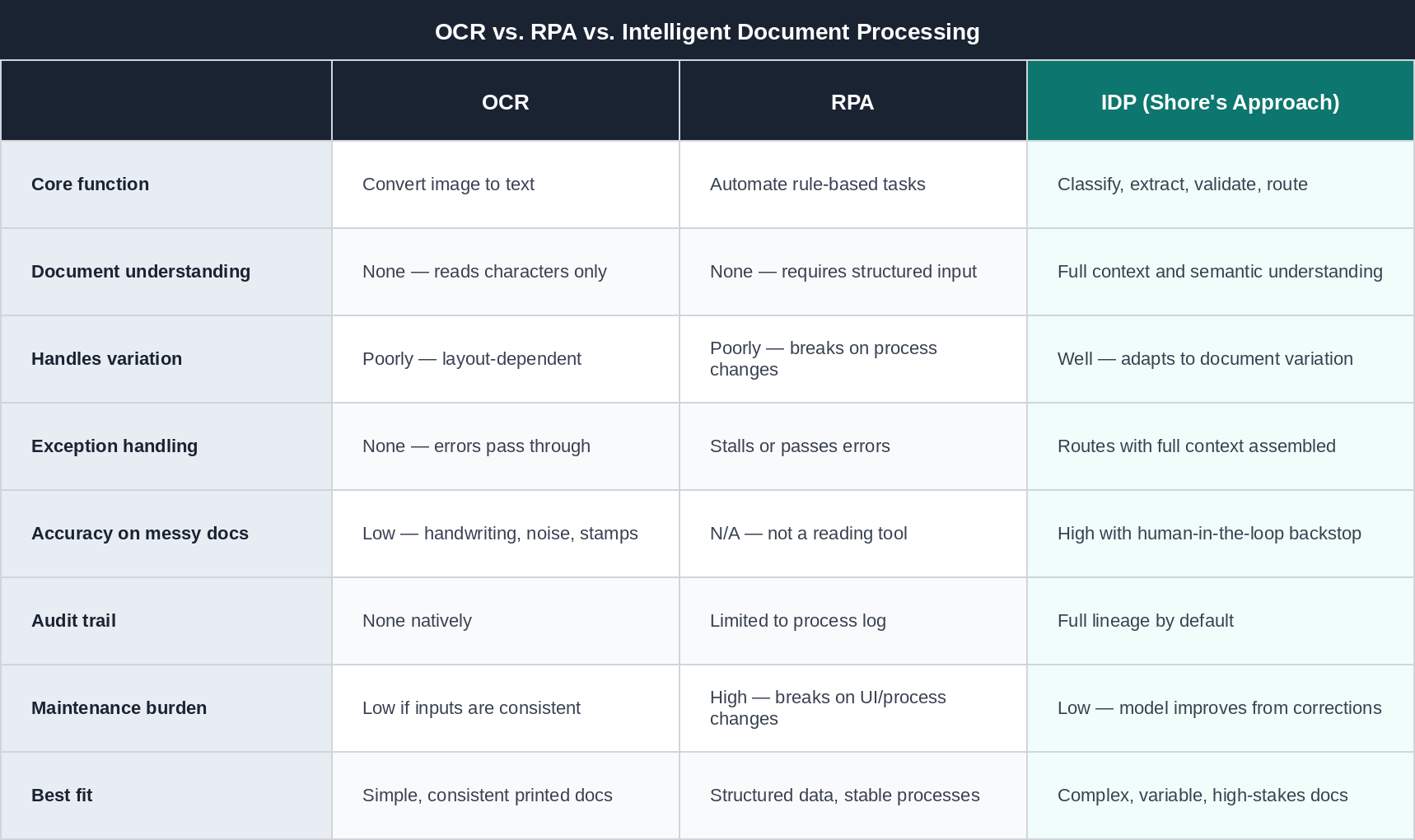
Which One Does Your Business Actually Need?
The honest answer is that the right choice depends on the documents you process and what you need to do with the data.
OCR may be sufficient if...
Your documents are printed, consistent in layout, and clean
The goal is searchability or archiving rather than structured data extraction
Volume is high, variety is low, and exception rates are acceptable
The downstream workflow does not require field-level validation
RPA is the right tool if...
You already have clean, structured data and need to move it between systems
The process is stable, follows the same sequence every time, and exceptions are rare
Systems lack APIs and screen-level automation is the only integration path
Document reading is handled upstream by a separate tool
IDP is the right choice if...
Documents vary in layout, format, or structure across instances
Extraction errors have meaningful downstream consequences, including compliance, financial accuracy, and customer decisions
Exceptions need to reach human reviewers with context already assembled
Audit trails and data lineage are required for regulatory or quality reasons
You need straight-through processing rates above 80% without manual pre-processing
In practice, the three often work together
Many mature document automation workflows combine all three. OCR as a character recognition layer feeding IDP. IDP handling classification, extraction, and validation. RPA automating the downstream system writes once clean data is available. The mistake is deploying any one of them as though it handles the full workflow on its own.
Frequently Asked Questions
Is IDP the same as AI document processing?
The terms are used interchangeably in most contexts. IDP is the category name that predates the widespread use of AI as a marketing term. What both describe is document processing that goes beyond character recognition to include classification, context-aware extraction, and validation. The distinction matters mainly when a vendor uses AI document processing to describe what is effectively OCR with a marketing refresh. The test is whether the system classifies documents, validates field relationships across documents, and handles exceptions with context.
Can IDP replace OCR entirely?
IDP typically includes an OCR layer for character recognition. The difference is everything that happens after that layer. OCR as a standalone tool stops at text output. IDP uses the text output as input to classification, extraction, and validation logic. So IDP subsumes OCR rather than replacing it. What IDP replaces is the manual work that OCR alone requires downstream.
Does IDP work with handwritten documents?
Modern IDP systems handle handwriting with varying accuracy depending on the legibility of the handwriting and whether the model has been trained on similar samples. Accuracy is lower than for printed text but typically substantially higher than general OCR on handwritten content. Items where handwriting confidence falls below threshold route to human review, which is the appropriate handling for genuinely ambiguous input.
How does IDP handle documents in multiple languages?
IDP systems built on multilingual models can classify and extract from documents in dozens of languages without requiring separate models for each. This matters for financial services organizations processing documents from international entities or multilingual customer bases.
What is the difference between IDP and a document management system?
A document management system stores, organizes, and retrieves documents. It does not extract structured data from them. IDP extracts structured data from documents and delivers it to downstream systems. The two are complementary: a document management system is where documents live, IDP is what pulls usable data out of them. Many organizations need both.
Ready to Transform Your Operations?
Shore Group runs IDP on your documents as a fully managed service. Classification, extraction, validation, and exception routing — we own the process, you receive clean structured data.
See How It Works